
Settings (iOS)
Settings are accessible via the tab of the same name in the global tab bar (from the shows overview, not within a show).
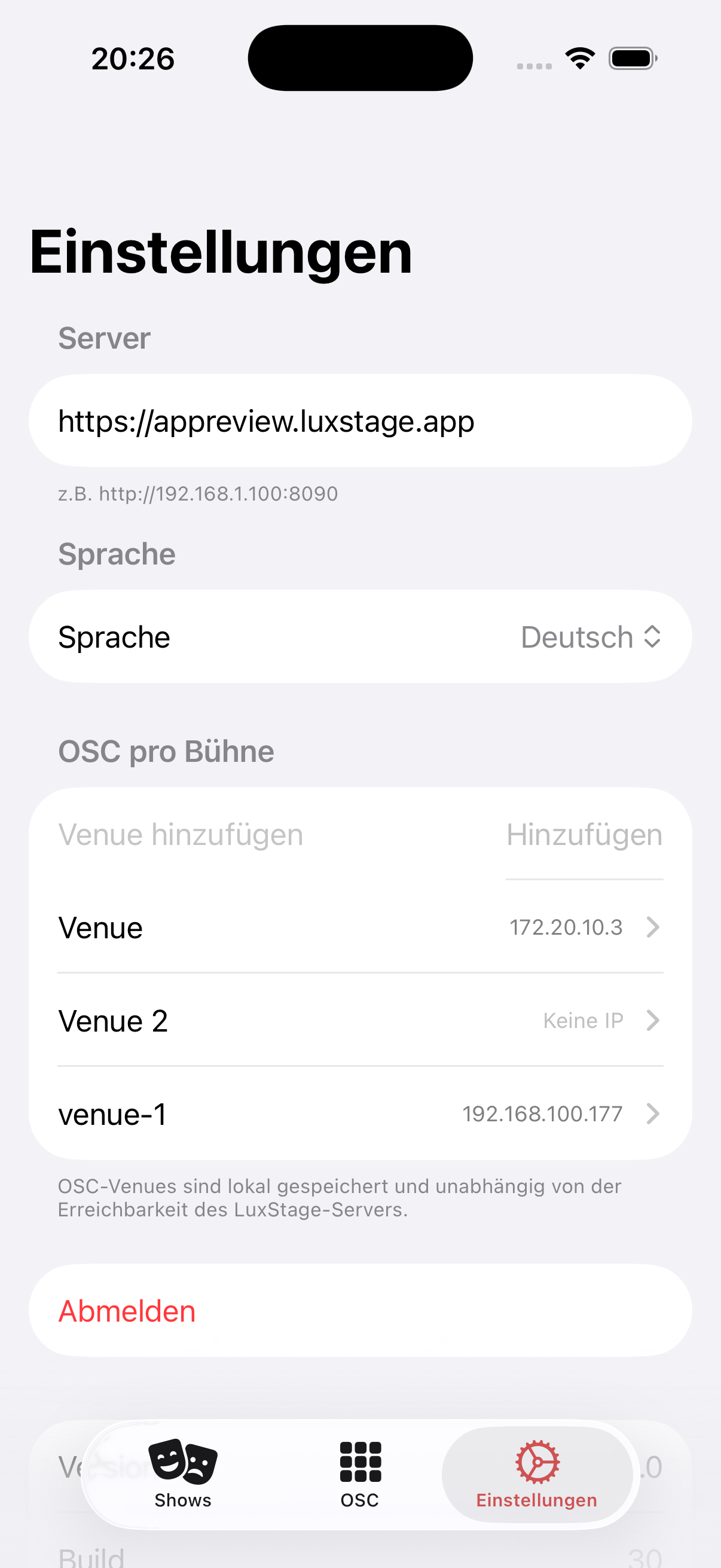
Server
In the Server field, enter the URL of the LuxStage server, e.g. http://192.168.1.100:8090. Without a valid server URL, the app cannot load any shows.
Language
Use the Language menu to select the display language of the app (e.g. English).
OSC connection
The list of venues is stored locally on the device. Server suggestions (login required) can be added with a tap, and you can add your own venues with a name and IP. Tapping a venue makes it the active connection for the whole app.
- Eos User — stepper (−1 to 99). The value applies device-wide, is saved immediately and survives app restarts and updates. Changing it reconnects the app automatically.
Using the ETC RFR app too
If you also use the ETC RFR app, pick a different Eos user there than in LuxStage, otherwise the two apps interfere with each other.
Diagnostics
Optionally, and only with your consent, the app sends crashes and an anonymous connection log (connection and app states such as standby or network changes, no show content). Send log now transmits the log immediately, e.g. for support.
Sign out
The Sign out button ends the session and returns to the server entry screen.